
Connecting Youth Workers to technology for ministry. YPTech is written by Youth Pastors who are "in the trenches" doing Youth Ministry.
Wednesday, November 23, 2011
Pick up this app ASAP!
Check out this application on the iOS iPad App Store: Notability - handwriting, note taking, audio recording, annotate PDFs, cloud sync your notes to Dropbox, and more.Ginger LabsCategory: ProductivityUpdated: Nov 08, 2011I was looking through the "top 25“ list and I noticed what appeared to me to be a new program to the paid list (although I'm fairly certain it's been ranked somewhere in the list at some point). It's another note taking app, but at only .99 it's currently a real steal. It's on sale so make sure to pick it up soon. This app has a PDF reader/annotated, word processor, hand writing, audio recorder, and will take images for your notes using photos, your iPad 2 camera, websites, and more. Definitely a new tool in my arsenal for when I go to meetings. So pick it up and let me know your thoughts.

Tuesday, November 22, 2011
Review: Group Text App for iPhone

A friend and fellow youth pastor and iPhone user had a need expressed to me the other day. He needed a group messaging app that would allow him to overcome AT&T's 10 contact per message barrier. Basically, he needed a simple way to make groups (lists) of students and people so that he could send out a single text message to them. Maybe for an announcement, maybe for a reminder, maybe for a "snow day" notice...the sky is the limit.
I admitted that I didn't currently use such an app because up until now I've been paying for a text blast service through Simply Youth Ministry. My service plan, their lowest, costs my budget $10 each month and is a bit of a hassle because I either have to use their web interface that isn't mobile friendly at all, or have the right email for the particular list I was wanting to message. Due to budget issues, this wasn't an option for my friend. He already has unlimited texting on his cell plan, and he wanted his students to see that the messages come from him, not from some proxy service.
So what does a guy do? I did a little searching on iTunes and made a suggestion, Group Text ($2.99) by Redbits. I didn't know much about it, but the description seemed to match his needs and the images that were provided seemed like it might be adequate for his needs. So I sent my friend a link and offered that this might be a decent solution.
It didn't take long for him to declare this as his favorite and most useful app. So, I've jumped and am trying it. He's right, it does for a total of $2.99 what my $10/month plan did.
Here are the features:
- universal app (works on iPod, iPhone, or iPad)
- allows an unlimited number of groups (ie...parents, students, sr. high, jr. high, volunteers, certain schools)
- easily uses either your contacts from your phone, CSV (comma separated value) list, or just manual entry into each list to build your groups
- you can build templates for your messages
- and create 1-time custom groupings easily as well
- and so much more.
Nothing is perfect though. Right now with iOS 5 you have to turn off iMessages and group messaging that is build natively into iOS when you need to use the app. They are aware of the problem and are working on a solution. Another thing my friend noticed, and it wouldn't be long until I did as well, is that when you update a contact in your Contacts on your iPhone it doesn't automatically update the number in your list within the app, a bit of an inconvenience.
Over all, I can highly recommend this app. At only $2.99, it's a bargain (compared to some services) for those of us who are on the front lines of student ministry and want to keep in touch, send reminders, and keep communication lines open. At this point it looks like I may be canceling my online service and saving $10/month to take some students out for a Coke or coffee. Check it out and let us know your thoughts or if you have another suggestion in the comments.
Monday, June 6, 2011
The World of Apple just got better!
At the 2011 WWDC today the world of Apple seriously got an revolutionary bump.
If you have multiple devices from Apple, your world just got a huge bump of easiness.

If you have multiple devices from Apple, your world just got a huge bump of easiness.
- Basic features of contact, calendar, and mail went free for syncing between ALL your devices. (MobileMe is no more)
- iCloud syncs and backs up all your devices automatically, apps, documents, and even photos and makes them all available easily within your devices.
- You no longer have to have a computer to use a iDevice, the cord has been cut.
- Wireless syncing has been introduced for all your iDevices with iTunes
- purchase a song on any device within iTunes and it is automatically downloaded to your iDevice
- Take a photo on your iDevice and it is automatically stored (up to a 1000 photos for 30 days), and synced with your other devices, and automatically downloads to your computer for permanent storage.
- Play a game on one device and your save state is automatically uploaded to the cloud and synced between your other devices....(personally love this for angry birds)
So much more too, that's just a quick snapshot of the iOS portion of the presentation! Let me know your thoughts.
Friday, June 3, 2011
ARTICLE: Ready, Set, Go! Free Countdown Maker
Article as posted on Youth Ministry Geek:
=============================

Do you use countdown videos? Have you ever wanted to make your own? The fine people over at Digitalstache have now made it super easy, and it’s FREE: Ready, Set, Go!
From their site:
Download your free copy while you can.
Ready, Set, Go!
=============================
Do you use countdown videos? Have you ever wanted to make your own? The fine people over at Digitalstache have now made it super easy, and it’s FREE: Ready, Set, Go!
From their site:
Do you love countdown videos? Do you dream in descending digits? Can you grow mustache? Well check out the newest addition to the Digital Stache Gameshow Family: Ready, Set, Go! Ready, Set, Go! gives you 6 themes to choose from and let’s you set the countdown (or up), from one second to an hour! But here is the best part: we’re giving it away. That’s right, for an unlimited time, Ready, Set, Go! Is absolutely free! So download your copy today!
Download your free copy while you can.
Ready, Set, Go!
ARTICLE: ScoreKeep: Visual Scoreboard for Your Games
Article as posted on Youth Ministry Geek:
=============================

ScoreKeep
 is something almost every youthworker who plays games on their computer.
What is it you ask?
ScoreKeep
is a visual scoreboard that projects onto your screen. I’ve tried it out, and it’s super easy to use. The first thing you do is setup your team names. You are limited to just two teams but for most games I think that’s enough. You can also setup how points are awarded for each “+” you award. It also has a timer built in that you can set to go up or down.Setup screen:
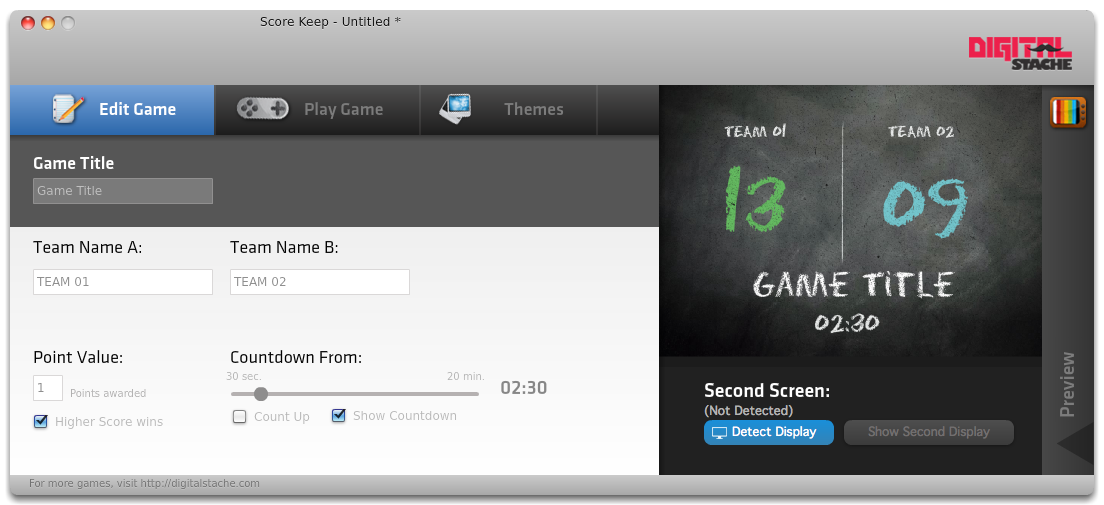
After setting up how you want your score to work, you can pick your theme. Five are included and they all look nice and are diverse to apply to many different gaming situations. The included themes are 1. Chalkboard theme that looks like is sounds, hand written chalk on a blackboard, 2. LED that looks like an 80′s digital watch, 3. Marquee that has a movie theater [...]
Continue Reading 'ScoreKeep: Visual Scoreboard for Your Games'
Tuesday, May 31, 2011
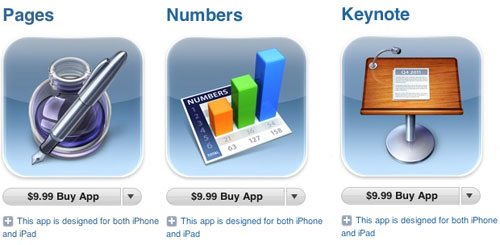
iWork suite for iPhone/iPod Touch
Thursday, May 12, 2011
Personalized Street Sign for $17 + $3 s&h
Ever wanted your youth ministry's name on a street sign? Walmart has them on sale!
 Walmart offers this Personalized Street Sign for $16.72. Shipping adds $2.97, or opt for free Site-to-Store. Even with shipping, that's the lowest total price we could find for a similar sign by $11. Sales tax is added where applicable. This sign measures 23-1/2' x 5-7/8' and can be personalized up to 26 characters."
Monday, May 9, 2011
Worship Band with GarageBand

One obvious reason is you may be cramped on space. Maybe your stage is tiny or it's big but loaded with tons of stuff. Either way, having an entire drum kit fit on your lap is a huge space saver!
An even better reason than space is smart instruments. With the new GarageBand app for the iPad comes a new feature called smart instruments. It makes playing the guitar, base, keyboard, and drums as simple as pressing one button for every chord change. It makes music accessible to people who aren't musical! There are a couple downsides to the app. The smart drums may be too difficult to control for a live band unless you start out the song with them and then let them run. You also may have to be creative with the chords as there is a limited number of them.
Bottom-line, this app is definitely worth the $5 they charge and can really help a small youth group worship band add key players without finding musical geniuses!
Tuesday, March 15, 2011
Monday, March 14, 2011
Flash on iPad

Let us know what you think.
So here it is: iPad 2

Why did I get it? My high school daughter needs a laptop. So we plan to do a little shifting of the tech in our home. While I use the new iPad2 (32Gb wifi in black), my wife will begin using the original iPad (16Gb with 3G) as her main computer. This does incur a learning curve and a little bit of a change of patterns and habits, but she primarily uses a computer just for email, calendar and browsing news and such, which the iPad is perfect for. I will let you know later how this transition is going.
Why did I get the new one instead of saving a little change with an original model? Here's a little thinking about my choice:
Friday, February 25, 2011
REVIEW: Simply Youth LIVE Curriculum App

Let me encourage you to try it out. They have a free demo of the material that you can try out, allowing you an opportunity to take it for a test run before you decide to make the purchase. They have 2 versions, a 4-year Sr High and a 2-year Jr High set. 6 years of highly useful and flexible material.
There are a few things that I wish the app could do, like add their text service function (as it is on their website), and a little better calendar view, but over all it's a great app. Try it out and let us know your thoughts.
Thursday, February 10, 2011
Saturday, January 15, 2011
Website Do's and Don'ts

TOP 9 THINGS TO PUT ON YOUR WEBSITE FRONT PAGE:
- Your Phone Number
- What To Expect Link
- 60% Graphics (40% or less in words)
- Your Podcast Link
- Link to a Staff page (visitors want an email and picture of church staff)
- Search Box
- Login Box (if you have an online community)
- Facebook/Twitter Integration
- Your Worship Service Times
- Outdated info
- Under Construction
- A whiny excuse about why the website isn't better
- Address with a map or a link to a map
- Information about your ministries
- Updated calendar info
- Place to sign up for communication
- Office Hours
- Statement of Beliefs
- Online Giving (if you have the technology)
Olive Tree Sale
We have mentioned Olive Tree's Bible app for your iPhone and iPad before. It's among the best you can buy and it's on sale this weekend. In fact, everything is on sale for 20% off this weekend. Go to www.olivetree.com!
Friday, January 14, 2011
Add a Facebook Like Box to your website

With 500,000,000 people active on Facebook, we need as active as we can in this melding-pot of social media. A great way to do this is to add a Like Box to your own website. It links your group's facebook page (I'm assuming your group has one, if not - create one - it's free and very easy to do) to your church or youth group website.
The box is better in my opinion than the standard badges that people put on their website because it shows the entire status of your group page, and also can show even whoever has liked your page, allowing it to gain momentum.
It's as simple as 1, 2, 3. Here are the steps:
- Visit the Facebook Developer site for the like box
- Copy your Facebook group's URL into the box
- Copy the code that is provided and paste it into your website.
Hope this helps. Let us know.
Thursday, January 13, 2011
Facepad for the iPad

Try it out and let us know what you think.
Tuesday, January 11, 2011
Olive Tree BibleReader Update

For me the biggest and best part of the update is that it enabled syncing of your notes, highlights, and bookmarks between all your iOS devices. Something that I've been desiring ever since I got my iPad.
Check it out and let us know your thoughts & opinions.
New Year Tech Hints

So much is going on in tech news today, all about Verizon announcing it finally will be offering Apple's iPhone 4. I won't be talking about that though, it's being over done right now. If you want my opinion, feel free to ask in the comments and maybe we can write an interesting response that will come from a different point of view than all the others out there today.
What I do want to share is 3 simple words to help you as you begin the new year. Three simple plans of attack to help you keep moving as we try to make things easier on ourselves, allowing us more time to spend with students, and saving us from a lot of headaches.
So here we go...
Subscribe to:
Posts (Atom)