Monday, August 3, 2015
Apple Watch Review
I've now had my Watch for 2 months. I've held off writing about it for 2 reasons, I wasn't sure what to say and how would it apply to Youth Ministry.
It's time to talk about it, but first let me put this out there. I'm a tech guy, I love tech. Which frankly, explains why I write for this blog. Secondly, I'm a watch guy. Always have been. And when the 2 combine...well, I'm in a better place.
Monday, February 17, 2014
IDEA: Have students text in their vote.
Our student ministry is about to have a simple and very familiar thing in youth ministry: a movie night.
It's simple until you get to 1 thing, the movie to be watched. So as a group of student leaders and I were discussing what movie to watch they came up with a great idea... let's vote on it. Allow the students to help make the choice. It gives buy-in and allows everyone's voice to be heard in at least a general sense.
So rather than having a stack of acceptable DVD titles ready to go we did something a little different. We voted on it.
It's simple until you get to 1 thing, the movie to be watched. So as a group of student leaders and I were discussing what movie to watch they came up with a great idea... let's vote on it. Allow the students to help make the choice. It gives buy-in and allows everyone's voice to be heard in at least a general sense.So rather than having a stack of acceptable DVD titles ready to go we did something a little different. We voted on it.
Tuesday, January 21, 2014
Is Facebook dead to our students?
This topic has been visited a lot recently, but according to a recent study, although the social media options are wide open, for many students Facebook is still a viable option.
Read the full article here.
Labels:
Facebook,
Social Networking,
students
Tuesday, January 7, 2014
Pebble-icious
I admit it. Unlike the many younger, more "hip" people that get to hang out with as a youth pastor, I am a watch guy. There I said it. I like watches. Always have. I even prefer analog to digital because I like the classy look. But since the invention of the calculator-watch (of which I saved up for as a young teenager - and I know that really dates me) watches haven't really evolved into much that could be considered "techy" at all. While some have heart-rate monitors and such, the overall function hasn't changed much in the past 30 years.
I admit that I was one of those fanboys that utilized the square iPod Nano with a cool watchband and had a watch that people asked about, but it was far from anything more than a conversation piece. I wanted something more.
My family surprised me on Christmas morning with just that. A watch that was oh-so-much more. A Pebble watch, that niche kickstarted project that has made it to retail prime-time. It works with Android and with the latest SDK release it works REALLY well with iOS. I mean it really is a fairly seamless experience.
[read more after the break]
I admit that I was one of those fanboys that utilized the square iPod Nano with a cool watchband and had a watch that people asked about, but it was far from anything more than a conversation piece. I wanted something more.
My family surprised me on Christmas morning with just that. A watch that was oh-so-much more. A Pebble watch, that niche kickstarted project that has made it to retail prime-time. It works with Android and with the latest SDK release it works REALLY well with iOS. I mean it really is a fairly seamless experience. [read more after the break]
Labels:
connected,
pebble,
Smartphone,
tech,
watch
Tuesday, December 3, 2013
Digital Credit Card
I'm looking forward to the day I won't need my wallet anymore to carry around my credit cards and reward cards, but the truth is too many vendors still require real plastic instead of scanning your iPhone. In the meantime, here's a great solution...
Labels:
accessories,
Apps,
Finances,
Money,
review
Swipe Swipe
If you haven't upgraded to iOS 7, there's a small feature that I have found hugely beneficial: it's easy to unlock with your nose! If you're like me and haven't forked out the cash for a pair of touchscreen gloves to use your iPhone while wearing gloves, you're stuck with two options...
Thursday, October 17, 2013
Pinterest Perfect Ministry
I resisted Pinterest in the interest of keeping my MAN CARD for a long time. In the past 12 months Pinterest has grown up a bit and stretched beyond a girly social site to a marketing social media that has way more potential than Google+ (although, that's still not saying much).
Labels:
Apps,
Communication,
Decoration,
Design,
Events,
ideas,
Organization,
Social Networking,
Theology,
travel,
Youth Room
Monday, September 16, 2013
Square
This may seem like a no brainer, but if you're not setup to use Square in your youth ministry, do it now! Square is a simple way to take credit cards for youth trips, candy from your snack shack, and everything in between. It's also a great way to send parents a receipt for cash or checks they may give you for their teens. Think about adding credit card payments to your next car wash! This concept is huge.
Labels:
accessories,
Android,
Apps,
Events,
Finances,
Fundraisers,
iOS,
iPad,
iPhone,
Money,
Parents,
Sale,
Smartphone,
software,
Tools
Friday, January 13, 2012
ARTICLE: The Dark Knight Would Love To Dock His iPad In This Amazing Bat-Cycle [Gallery / CES 2012]
I saw this article and had to share it. It's not exactly a solution to 15 passenger van, but somewhere that has to be a church board or group of elders willing to take a chance on this as the church's transportation vehicle.
-J
MORE PICS...
Saturday, January 7, 2012
Edit Office Docs On Your iPad For Free
Check out this new app in the AppStore called CloudOn. It is a free app and links into your DropBox account, which is also free, and let's you edit any of your Microsoft Office documents. It also has an autosave feature so you don't have to worry about saving. One more nice feature is a connection status to verify that you are connected online and your doc is saving correctly.
Labels:
apple,
Apps,
Cloud,
iOS,
iPad,
mobile,
note taking,
Organization,
productivity,
publishing,
resources,
review,
software,
Tools,
travel,
word processing
Wednesday, November 23, 2011
Pick up this app ASAP!
Check out this application on the iOS iPad App Store: Notability - handwriting, note taking, audio recording, annotate PDFs, cloud sync your notes to Dropbox, and more.Ginger LabsCategory: ProductivityUpdated: Nov 08, 2011I was looking through the "top 25“ list and I noticed what appeared to me to be a new program to the paid list (although I'm fairly certain it's been ranked somewhere in the list at some point). It's another note taking app, but at only .99 it's currently a real steal. It's on sale so make sure to pick it up soon. This app has a PDF reader/annotated, word processor, hand writing, audio recorder, and will take images for your notes using photos, your iPad 2 camera, websites, and more. Definitely a new tool in my arsenal for when I go to meetings. So pick it up and let me know your thoughts.
Labels:
audio notes,
iPad,
note taking,
productivity,
word processing
Tuesday, November 22, 2011
Review: Group Text App for iPhone
Have you ever needed to message a consistent group of people but at some point accidentally failed to message 1 person in the group? Yeah, me too. Sometimes online services just aren't handy enough. I, and many of you, need something in our hands.
A friend and fellow youth pastor and iPhone user had a need expressed to me the other day. He needed a group messaging app that would allow him to overcome AT&T's 10 contact per message barrier. Basically, he needed a simple way to make groups (lists) of students and people so that he could send out a single text message to them. Maybe for an announcement, maybe for a reminder, maybe for a "snow day" notice...the sky is the limit.
I admitted that I didn't currently use such an app because up until now I've been paying for a text blast service through Simply Youth Ministry. My service plan, their lowest, costs my budget $10 each month and is a bit of a hassle because I either have to use their web interface that isn't mobile friendly at all, or have the right email for the particular list I was wanting to message. Due to budget issues, this wasn't an option for my friend. He already has unlimited texting on his cell plan, and he wanted his students to see that the messages come from him, not from some proxy service.
So what does a guy do? I did a little searching on iTunes and made a suggestion, Group Text ($2.99) by Redbits. I didn't know much about it, but the description seemed to match his needs and the images that were provided seemed like it might be adequate for his needs. So I sent my friend a link and offered that this might be a decent solution.
It didn't take long for him to declare this as his favorite and most useful app. So, I've jumped and am trying it. He's right, it does for a total of $2.99 what my $10/month plan did.
Here are the features:
A friend and fellow youth pastor and iPhone user had a need expressed to me the other day. He needed a group messaging app that would allow him to overcome AT&T's 10 contact per message barrier. Basically, he needed a simple way to make groups (lists) of students and people so that he could send out a single text message to them. Maybe for an announcement, maybe for a reminder, maybe for a "snow day" notice...the sky is the limit.
I admitted that I didn't currently use such an app because up until now I've been paying for a text blast service through Simply Youth Ministry. My service plan, their lowest, costs my budget $10 each month and is a bit of a hassle because I either have to use their web interface that isn't mobile friendly at all, or have the right email for the particular list I was wanting to message. Due to budget issues, this wasn't an option for my friend. He already has unlimited texting on his cell plan, and he wanted his students to see that the messages come from him, not from some proxy service.
So what does a guy do? I did a little searching on iTunes and made a suggestion, Group Text ($2.99) by Redbits. I didn't know much about it, but the description seemed to match his needs and the images that were provided seemed like it might be adequate for his needs. So I sent my friend a link and offered that this might be a decent solution.
It didn't take long for him to declare this as his favorite and most useful app. So, I've jumped and am trying it. He's right, it does for a total of $2.99 what my $10/month plan did.
Here are the features:
- universal app (works on iPod, iPhone, or iPad)
- allows an unlimited number of groups (ie...parents, students, sr. high, jr. high, volunteers, certain schools)
- easily uses either your contacts from your phone, CSV (comma separated value) list, or just manual entry into each list to build your groups
- you can build templates for your messages
- and create 1-time custom groupings easily as well
- and so much more.
Nothing is perfect though. Right now with iOS 5 you have to turn off iMessages and group messaging that is build natively into iOS when you need to use the app. They are aware of the problem and are working on a solution. Another thing my friend noticed, and it wouldn't be long until I did as well, is that when you update a contact in your Contacts on your iPhone it doesn't automatically update the number in your list within the app, a bit of an inconvenience.
Over all, I can highly recommend this app. At only $2.99, it's a bargain (compared to some services) for those of us who are on the front lines of student ministry and want to keep in touch, send reminders, and keep communication lines open. At this point it looks like I may be canceling my online service and saving $10/month to take some students out for a Coke or coffee. Check it out and let us know your thoughts or if you have another suggestion in the comments.
Monday, June 6, 2011
The World of Apple just got better!
At the 2011 WWDC today the world of Apple seriously got an revolutionary bump.
If you have multiple devices from Apple, your world just got a huge bump of easiness.
- Basic features of contact, calendar, and mail went free for syncing between ALL your devices. (MobileMe is no more)
- iCloud syncs and backs up all your devices automatically, apps, documents, and even photos and makes them all available easily within your devices.
- You no longer have to have a computer to use a iDevice, the cord has been cut.
- Wireless syncing has been introduced for all your iDevices with iTunes
- purchase a song on any device within iTunes and it is automatically downloaded to your iDevice
- Take a photo on your iDevice and it is automatically stored (up to a 1000 photos for 30 days), and synced with your other devices, and automatically downloads to your computer for permanent storage.
- Play a game on one device and your save state is automatically uploaded to the cloud and synced between your other devices....(personally love this for angry birds)
So much more too, that's just a quick snapshot of the iOS portion of the presentation! Let me know your thoughts.
Friday, June 3, 2011
ARTICLE: Ready, Set, Go! Free Countdown Maker
Article as posted on Youth Ministry Geek:
=============================

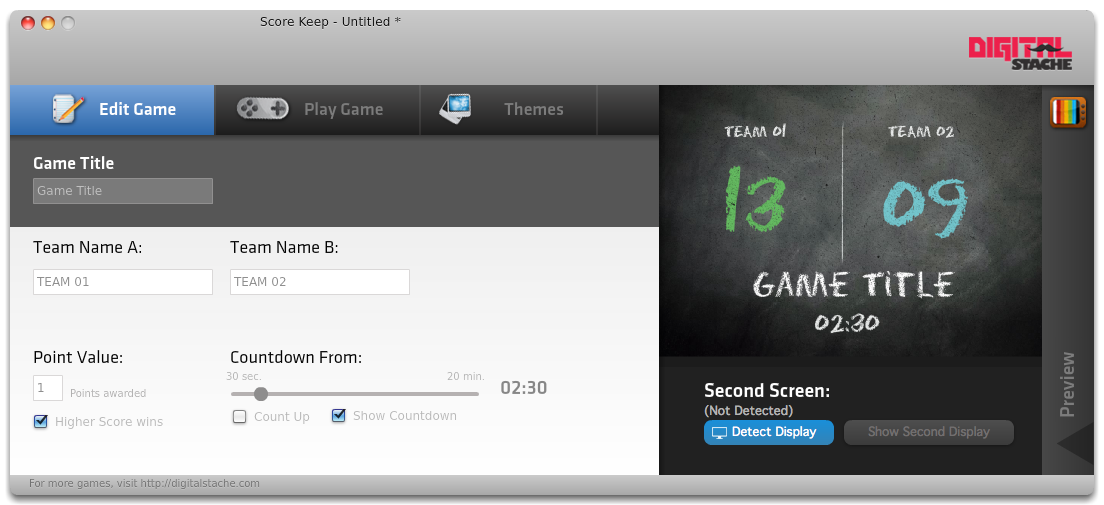
Do you use countdown videos? Have you ever wanted to make your own? The fine people over at Digitalstache have now made it super easy, and it’s FREE: Ready, Set, Go!
From their site:
Download your free copy while you can.
Ready, Set, Go!
=============================
Do you use countdown videos? Have you ever wanted to make your own? The fine people over at Digitalstache have now made it super easy, and it’s FREE: Ready, Set, Go!
From their site:
Do you love countdown videos? Do you dream in descending digits? Can you grow mustache? Well check out the newest addition to the Digital Stache Gameshow Family: Ready, Set, Go! Ready, Set, Go! gives you 6 themes to choose from and let’s you set the countdown (or up), from one second to an hour! But here is the best part: we’re giving it away. That’s right, for an unlimited time, Ready, Set, Go! Is absolutely free! So download your copy today!
Download your free copy while you can.
Ready, Set, Go!
ARTICLE: ScoreKeep: Visual Scoreboard for Your Games
Article as posted on Youth Ministry Geek:
=============================ScoreKeep
What is it you ask?
ScoreKeep
Setup screen:
After setting up how you want your score to work, you can pick your theme. Five are included and they all look nice and are diverse to apply to many different gaming situations. The included themes are 1. Chalkboard theme that looks like is sounds, hand written chalk on a blackboard, 2. LED that looks like an 80′s digital watch, 3. Marquee that has a movie theater [...]
Continue Reading 'ScoreKeep: Visual Scoreboard for Your Games'
Tuesday, May 31, 2011
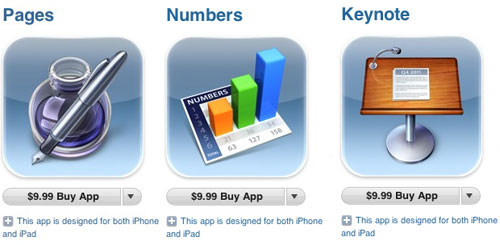
iWork suite for iPhone/iPod Touch
Thursday, May 12, 2011
Personalized Street Sign for $17 + $3 s&h
Ever wanted your youth ministry's name on a street sign? Walmart has them on sale!
Labels:
publishing,
Sale,
Youth Room
Monday, May 9, 2011
Worship Band with GarageBand
Let's face it, music instrument apps are cool as is. Students love to play them and bands that have them are that much cooler. But is there a better reason to add some iPads on your worship team besides the coolness? YES!
One obvious reason is you may be cramped on space. Maybe your stage is tiny or it's big but loaded with tons of stuff. Either way, having an entire drum kit fit on your lap is a huge space saver!
An even better reason than space is smart instruments. With the new GarageBand app for the iPad comes a new feature called smart instruments. It makes playing the guitar, base, keyboard, and drums as simple as pressing one button for every chord change. It makes music accessible to people who aren't musical! There are a couple downsides to the app. The smart drums may be too difficult to control for a live band unless you start out the song with them and then let them run. You also may have to be creative with the chords as there is a limited number of them.
Bottom-line, this app is definitely worth the $5 they charge and can really help a small youth group worship band add key players without finding musical geniuses!
Tuesday, March 15, 2011
Subscribe to:
Posts (Atom)